CapitaLog is a planning, review and analytics tool for discretionary trading. It supports the full loop: write a plan before entering a position, record the trades that follow, and review the results by strategy and by conviction.
Open the live demo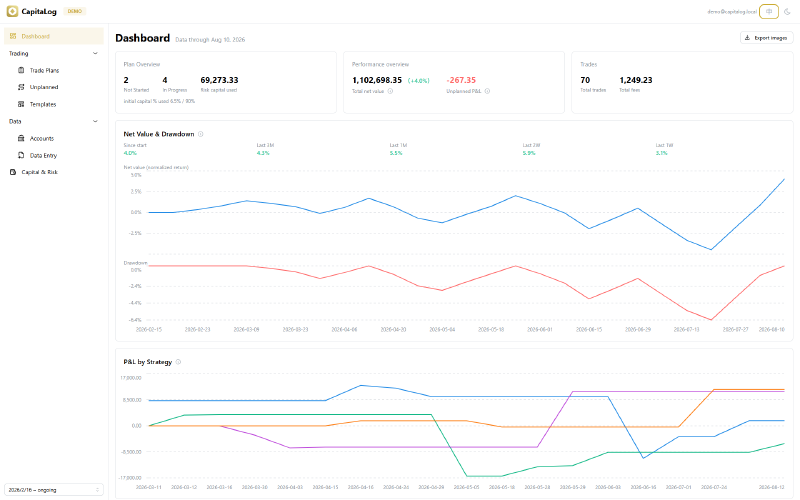
Motivation #
For a discretionary trader, keeping good records is itself an edge. A written plan makes an idea reviewable, and an honest review is what turns a set of trades into feedback. Most journals record trades after the fact. CapitaLog records the plan first, then attaches the trades to it, so that when a position closes the outcome can be compared against the conviction and the risk that were set beforehand.
Features #
Strategy templates #
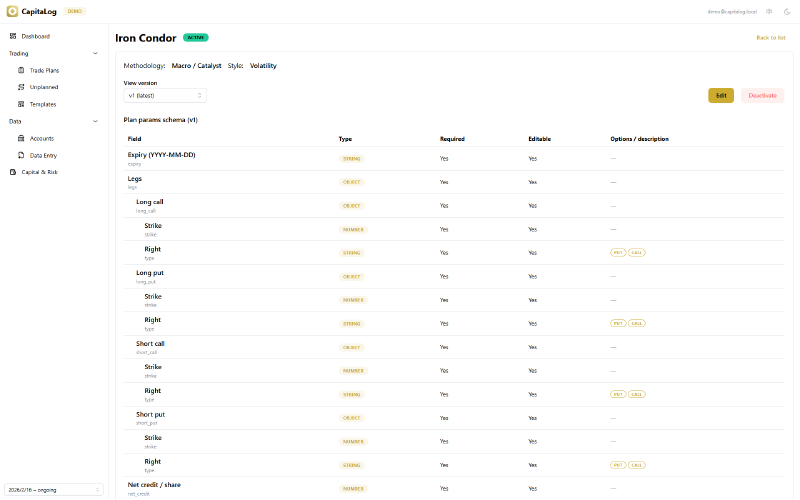
Different strategies need to record different things. A breakout setup has an entry, a stop and a catalyst; an iron condor has an underlying range and four legs with strikes. CapitaLog lets you define a template per strategy with its own fields, including nested and repeating ones, rather than fitting every strategy into one fixed form.
Each template is tagged with a methodology (technical, fundamental, macro/catalyst, quantitative) and a style (momentum, reversion, relative value, volatility), which is what makes performance comparable across strategies later. Templates are versioned: changing the fields creates a new version, and existing plans keep the version they were created with. Individual fields can be marked read-only, so parts of a thesis cannot be edited after the trade. A template version can also carry a methodology document, so the reasoning behind a strategy travels with the fields that record it.
Trade plans #
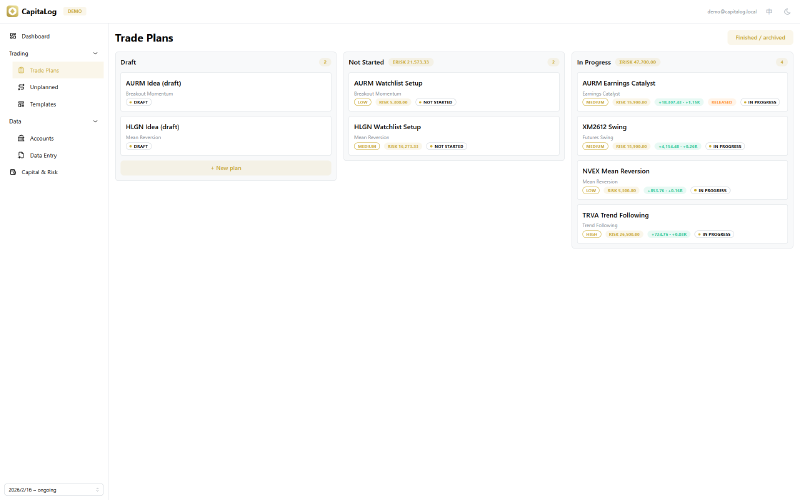
A plan holds a strategy template, a conviction level, a capital allocation, and a trade idea document written before the position is opened. Plans move across a board with four states: draft, not started, in progress, and finished or abandoned.
A plan becomes “in progress” when a trade is linked to it, not by a manual action, so its state reflects the actual position. While it is open, the board and the plan itself show the current profit and loss and the R multiple it represents, so the position can be read against the risk that was set for it. Finishing a plan requires all positions to be closed, a written review, and a note of how the position was exited before the profit and loss is recorded. Abandoning a plan records a reason from a fixed list, which keeps dropped ideas in the record instead of leaving a gap.
Risk management #
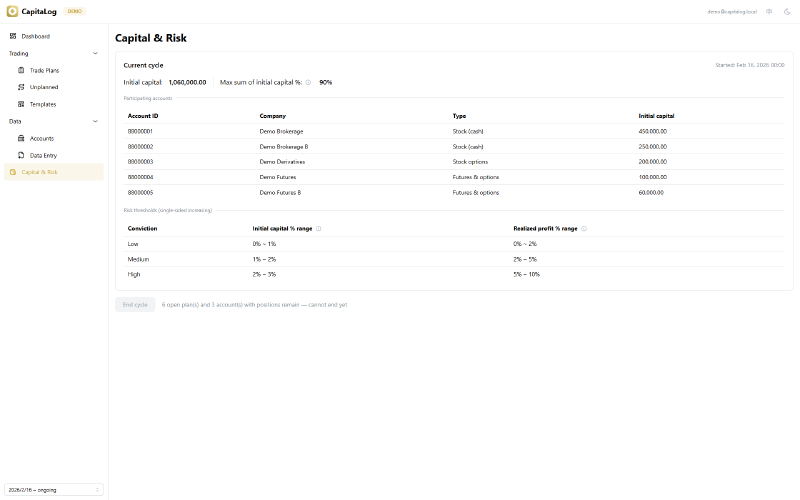
Position sizing is set within an evaluation cycle: a period with a fixed starting capital and a risk framework defined at the start.
For each conviction level, you set the share of initial capital and the share of realized profit that a single plan may risk. A plan’s absolute risk follows from those percentages, and the total across all open plans is checked against the cycle’s budget on submission, so the framework cannot be exceeded by accident. When a position is in profit, its risk can be released to free capacity for new plans while keeping the risk the plan was originally assigned, which keeps the R-multiple figures consistent.
Conviction and risk parameters are fixed once a plan is submitted, so the analytics that group results by conviction reflect the decision made before the outcome was known.
Broker statement import #
Daily data entry is where most journals are abandoned, so CapitaLog reads broker files directly. Uploading a settlement statement produces the day’s fund movements, executions and end-of-day positions, which can be reviewed and corrected before saving. Executions are then linked to plans in bulk rather than one at a time.
A fill carries both of its real dates. A futures night-session trade executed at 21:06 one evening settles on the following trading day — the day whose statement, settlement prices and equity account for it. CapitaLog keeps the true timestamp and the settlement day separately, so a position is never compared against a snapshot that predates it.
The day’s data is checked for consistency: deposits and withdrawals across accounts must net to zero, each account’s closing equity must follow from the previous day plus the day’s activity, and a position that has no recorded origin is rejected rather than saved. Before anything is written, a preview shows the account snapshots the entry will produce, along with the plans that are about to move to in progress. Data entry is final once submitted, so the preview is the point at which mistakes are caught.
Cash equity, exchange-traded stock options, and futures with futures options are supported together, each valued according to how its market settles.
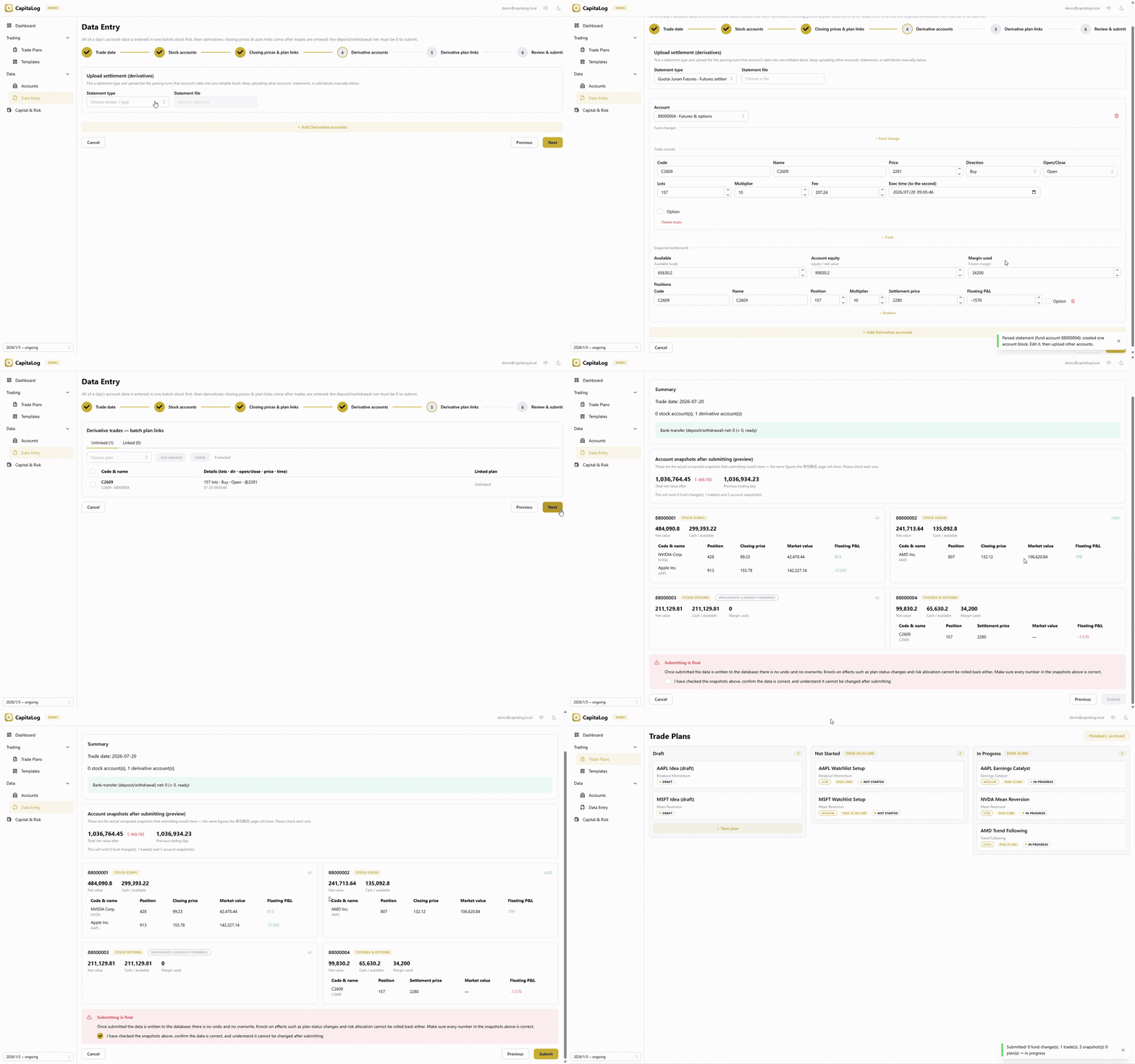
Select a statement type, upload, review, then preview the exact snapshots before submitting.
Plan timeline #
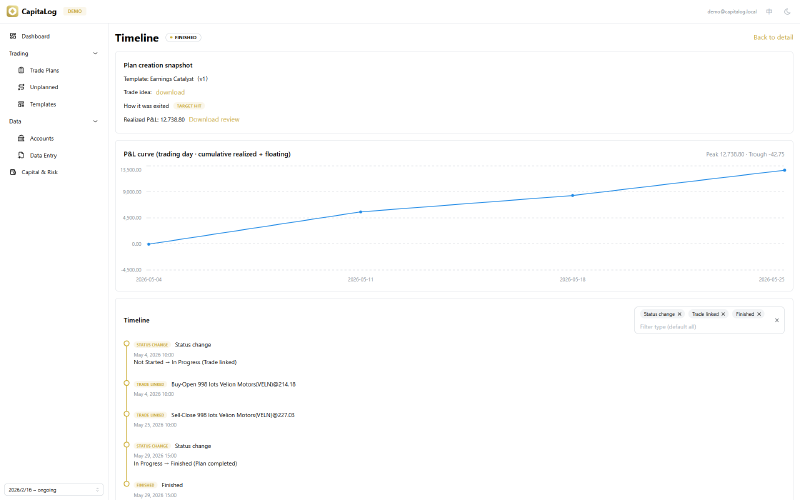
Each plan keeps a full history: the snapshot as it was created, the trade idea document, every field edit with its previous and new values, status changes, the executions linked to it, the review document, and the abandon reason where applicable.
The timeline also charts the plan’s profit and loss by trading day over its whole life, so a result is not reduced to a single closing number. This shows, for example, whether a profitable plan spent time underwater along the way.
Unplanned trades #
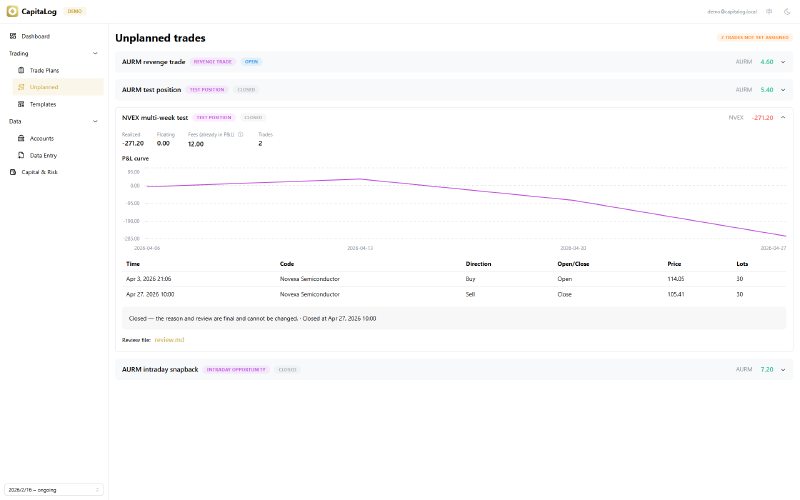
Not every trade follows a plan. Most journals leave those as an unexplained residue, which is precisely the part worth understanding. CapitaLog requires every execution to belong to either a plan or an unplanned episode, so nothing falls outside the record.
An episode is a group the trader defines, never one the system infers. What connects a set of executions is intent, and intent is not observable: rolling a futures position to a later month is one continuous trade across two contracts, while closing a losing position and opening an unrelated one to recover the loss is two separate decisions. Both look identical from the outside.
Each episode carries a reason from a fixed list — a thesis without the paperwork, an intraday opportunity, a test position, a hedge, a revenge trade, chasing a move, an execution error — and a written review. There is no “other” category: a catch-all collects everything and measures nothing, and the point of the labels is to find out which kind of deviation actually costs money. Closing an episode is a deliberate act that requires the review and every position closed, after which the record is final.
An episode records no conviction and no risk budget, because none was set in advance. Inventing them afterwards would corrupt the R-multiple figures that the planned side depends on, so unplanned results are measured in currency instead.
Dashboard and analytics #
The dashboard covers both account performance and the review process.
For the account, it shows an equity curve as return with drawdown on a shared axis, change rates over standard windows, and a performance overview with total net value and the profit and loss from trades made outside any plan. Every figure is labelled with the date it is current to, and the dashboard says so plainly when entry has fallen behind — the change rates are anchored to the last recorded day, not to today. The overview links to a page where each account’s snapshot on any past date can be checked against the broker.
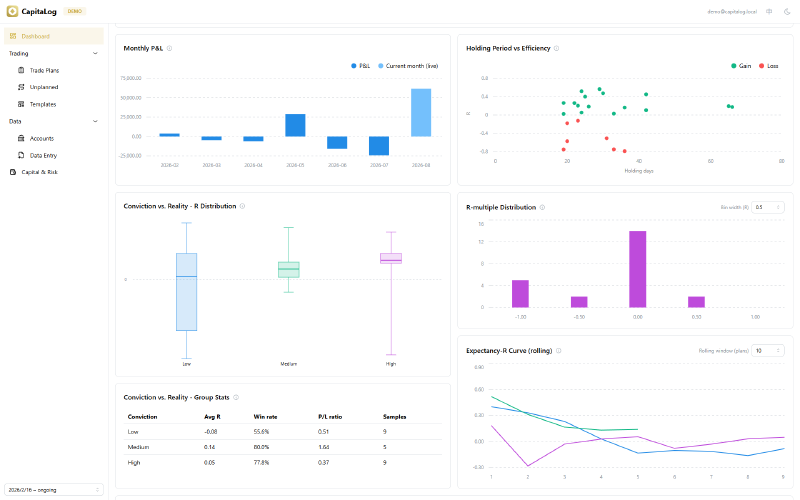
For the process, it shows cumulative profit and loss by strategy and monthly results — the month-over-month change in total net value, so open positions count and the bars reconcile with the equity curve rather than only reflecting closed plans. Alongside these are four analytics for reviewing discretionary decisions:
- R-multiple distribution: results in units of the risk taken, which allows a large position and a small one to be compared.
- Conviction versus reality: outcomes grouped by the conviction assigned beforehand, with win rate and profit factor per group.
- Holding period versus efficiency: one point per finished plan, relating time held to result.
- Rolling expectancy: expectancy in R over a moving window, by conviction level.
- Exit quality: for each way a position was closed, the average peak the plan reached, what it actually realized, and the gap between them.
The exit-quality view is worth a note on how it is measured. A plan’s best and worst points come from its own profit-and-loss curve, and its result is expressed against the risk budget that was set before entry. Neither needs a stop price, which matters because half the strategies a trader runs do not have one: an iron condor’s risk is the width of its spread less the credit taken, and an option’s price answers to the underlying, implied volatility and time at once, so no single threshold describes it. Measuring from the curve puts a four-leg option structure and a single-stock breakout on the same footing.
What the numbers cannot supply is why a position was closed, so that is recorded at the moment of closing, from a fixed list: target reached, risk rule triggered, thesis invalidated, expired, exited early with no condition met, or held past the plan. Read together, the two answer the question the app is named after — whether the trade followed the plan — and they tend to expose the most expensive habit in discretionary trading, which is taking winners early and losers late.
Two further views cover trading done outside the process: a side-by-side comparison of planned against unplanned results, and profit and loss grouped by the reason each deviation was recorded under. Together they answer whether going off-plan adds or destroys value, and which kind of deviation is responsible.
Widgets can be selected and exported as images: either one file each, or a single report with the period and return in a header — stacked in the order they appear rather than packed into a generated layout.
Past cycles remain available in a read-only view, so a previous period’s dashboard, plans and risk framework stay as they were.
Status #
CapitaLog is a personal tool built to product standards, and its data model, validation and analytics are designed to support multiple users without change. It is in daily use against real broker statements. The interface is available in Chinese and English.
Try it